Search for an AR drawing app and you'll find dozens of results promising to project a sketch onto your paper. Most of them aren't augmented reality at all. They're a transparent picture layered on top of your camera view — a neat trick, but not AR.
Here's how to tell real augmented reality drawing from the fake kind.
The "phone on a glass" test
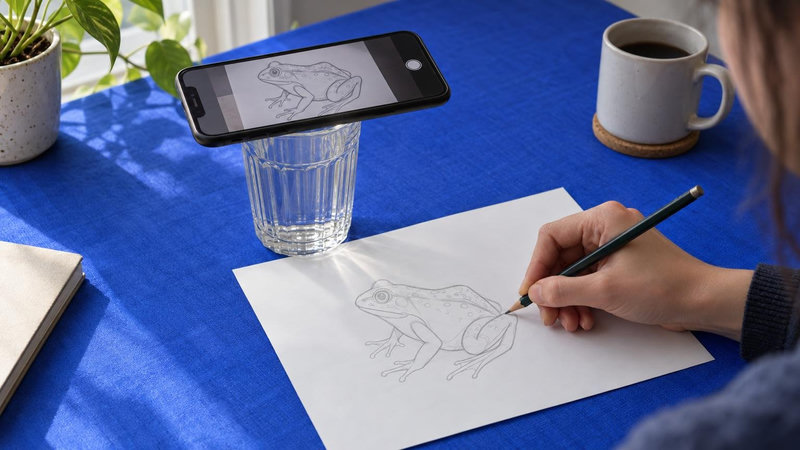
Just look at the App Store screenshots. If an app's only mode requires you to balance your phone on a stack of books, a glass, or a tripod and never move it — that's not AR. That's an overlay: a semi-transparent PNG sitting on the screen, locked to the display, not to your paper.
The giveaway is simple. Nudge the phone half a centimeter and the whole sketch slides out of place. Lean in to check a line and the proportions shift. You spend more time re-aligning your setup than drawing.

What real AR drawing actually does
Genuine augmented reality drawing tracks the surface, not the screen. The virtual sketch is anchored to your sheet of paper, so it stays exactly where it belongs:
At any angle. Look from the side, from above, from a comfortable seated position — the outline stays glued to the paper in correct perspective.
While the phone moves. Handheld, shaky, one-handed — the guide follows the paper automatically.
While your hand moves. Your wrist, pencil, and forearm pass over the sheet without breaking the projection.
At real scale. The sketch keeps its true size and proportions on the page instead of scaling with the screen.
That's the difference between tracing a screenshot and having a stencil that lives on your desk.

Why it matters for learning to draw
Drawing with an overlay teaches you to copy pixels. Drawing with real AR lets you focus on line quality, pressure, and hand control — the actual muscle memory of sketching. You can move freely, sit properly, and keep both hands where they should be: one holding the phone, one holding the pencil.
It also makes bigger work possible. Real surface tracking scales up from a sketchbook page to a canvas or a wall, which is why AR is used for murals and large-format lettering, not just A4 doodles.
Who invented AR drawing
The concept of AR drawing — and the tracking technology behind it — was created by artist and Sketchar founder Andrey (Adno) Drobitko in 2012. Everything that followed, including the flood of "prop your phone up" clones, came after.
Sketchar's AR mode projects your sketch directly onto paper and keeps it locked in place while you draw, at any angle, with any hand movement. You can bring your own photo, generate an image with AI art tools, pick from thousands of ready-made drawing lessons, or switch to the digital canvas when you'd rather draw on screen. On Meta Quest, the same idea goes room-scale with VR mural painting.
How to check any app in 30 seconds
Open the AR mode.
Pick up the phone and move it around.
Wave your hand over the paper.
If the sketch stays on the page — it's real AR. If it drifts with the screen — it's a transparent image, and you deserve better.
You can feel the difference in two minutes without installing anything. Open the free browser demo at sketchar.io/try: it lays your picture over the phone camera, half transparent, and you trace it – but the picture is pinned to the screen, not to the paper, so the phone has to stay still. That is the overlay. Then try the Sketchar app, pick the phone up and move it: the sketch stays on the page. That is tracking, and it is the whole difference this article is about.
Try real AR drawing in Sketchar and see the difference on your first sketch.
Download on iOS, Android, Meta
▋