Best canvas size for digital art: sizes for Instagram, print and wallpapers, in Sketchar and Procreate
Which canvas size to pick for social media, prints and wallpapers, what DPI really changes, and how big a canvas your phone or tablet can handle.
Short answer: pick the canvas size for where the drawing will end up, then go a little bigger. For Instagram, 2160 × 2700 px (twice the 1080 × 1350 post) is plenty. For print, multiply the size in inches by 300: an A4 print needs 2480 × 3508 px. A square 4096 × 4096 px canvas covers almost everything else. DPI only matters for print; on screens, only pixels count.
Pixels first, DPI second
A digital canvas is a grid of pixels. Width × height in pixels is the only thing that decides how sharp the drawing is and how much memory it uses.
DPI (dots per inch) is a note attached to the file that tells a printer how big to print it. A 3000 px wide drawing prints 10 inches wide at 300 DPI, or 20 inches at 150 DPI. On a phone screen or on Instagram the DPI number is ignored completely.
So when an app asks for DPI:
For screens, leave it at the default and set the size in pixels.
For print, set the size in inches or centimetres and 300 DPI, and let the app work out the pixels.
Canvas sizes for social media
Draw at about twice the final size, then export smaller. You get room for detail, and the downscale makes lines look crisper.
Instagram square post: 1080 × 1080 px, draw at 2160 × 2160.
Instagram portrait post: 1080 × 1350 px (4:5), draw at 2160 × 2700. This shape takes up the most space in the feed.
Stories, Reels, TikTok: 1080 × 1920 px (9:16), draw at 2160 × 3840.
YouTube thumbnail: 1280 × 720 px, draw at 2560 × 1440.
Webtoon-style vertical comics: 800 px wide, so a 1600 px wide canvas gives you a 2× margin.
Canvas sizes for print (300 DPI)
5 × 7 in: 1500 × 2100 px
A4 (8.3 × 11.7 in): 2480 × 3508 px
8 × 10 in: 2400 × 3000 px
11 × 14 in: 3300 × 4200 px
A3 (11.7 × 16.5 in): 3508 × 4961 px
Posters viewed from a distance print fine at 150–200 DPI, which halves the pixels you need.
Canvas sizes for wallpapers
Phone wallpaper: about 1290 × 2796 px covers the largest current iPhones; most Android phones are smaller.
Desktop wallpaper: 1920 × 1080 px for Full HD, 3840 × 2160 px for 4K.
Choose the canvas for the place the drawing is going, not for the biggest number the app allows.
Why bigger is not always better
Every layer is a full copy of the canvas in memory. Doubling the width and height makes each layer four times heavier. On many apps that means fewer layers, slower brushes and longer saves. In Procreate, a larger canvas directly lowers the maximum number of layers; see why Procreate runs out of layers.
A good rule: the smallest canvas that covers your largest planned output, plus a bit of room to crop.
How to set the canvas size in Procreate
Tap + in the Gallery. Pick a preset such as Screen Size, Square, 4K or A4, or tap the new canvas icon to set a custom width, height and DPI. Procreate shows the maximum number of layers for that size before you create it.
How to set the canvas size in Sketchar
Step 1 – Start a new project
Open Canvas and create a new drawing.
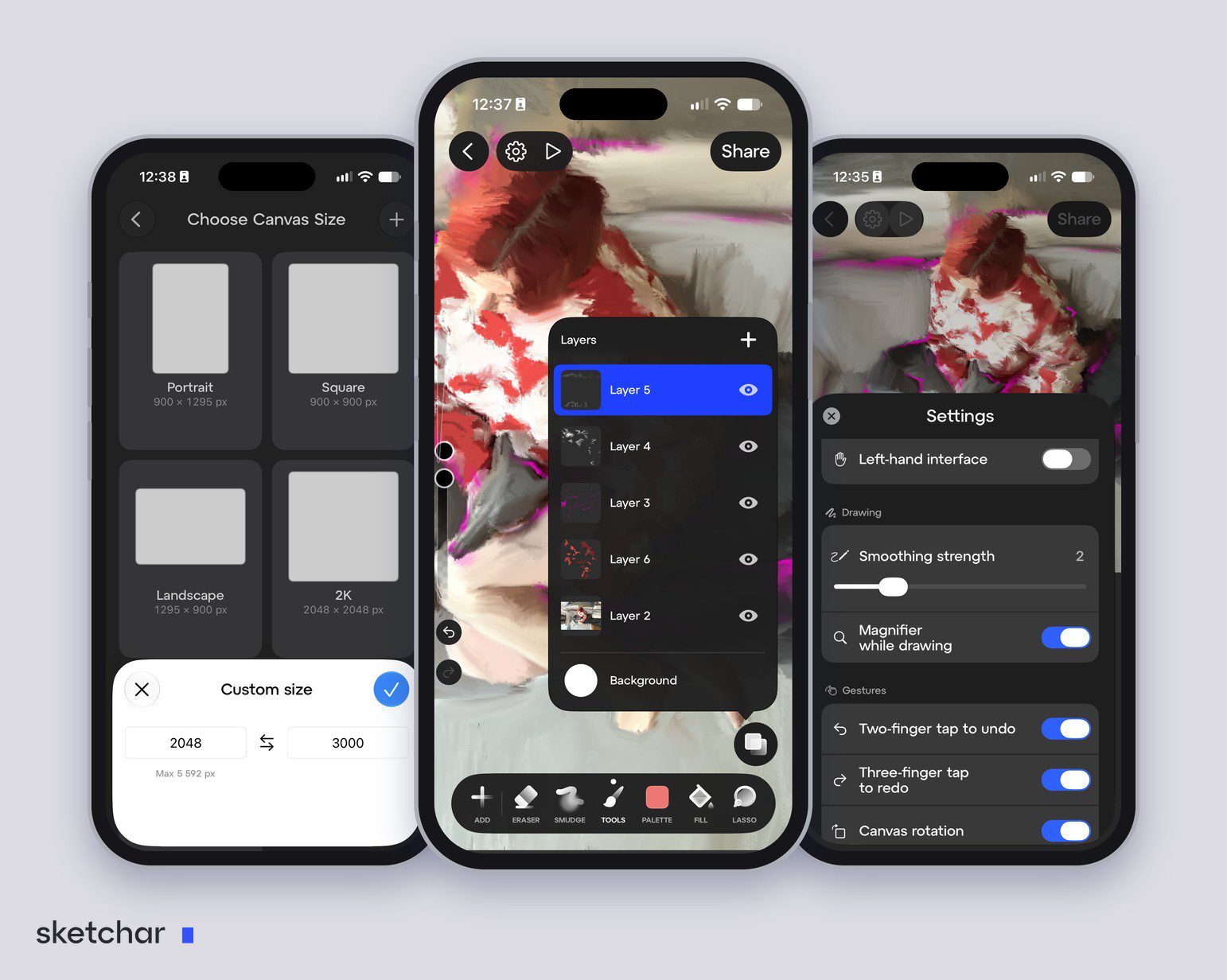
Step 2 – Pick a preset or your own size
Choose Portrait, Square, Landscape or 2K, or type your own width and height.
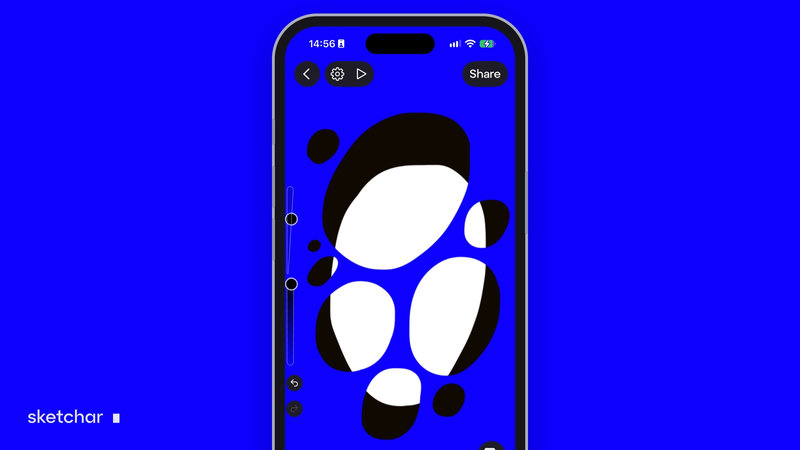
Step 3 – Check your device's maximum
The app shows the largest size your device can handle: 5,592 px on the iPhone in our screenshot. Since Sketchar 11 the canvas engine stores the drawing in tiles, so canvases up to 4096 × 4096 px work on devices with 3 GB of RAM, with up to 200 layers per project, on iOS and Android.
FAQ
What is the best canvas size for digital art? For most screen work, 2160 × 2700 px or 3000 × 3000 px. For print, the print size in inches × 300.
What is the best canvas size for Procreate? The same rules apply: size for the final output. Remember that a bigger canvas lowers Procreate's maximum number of layers.
What DPI should I use for digital art? 300 DPI for print. For screens DPI does not matter; set the size in pixels.
What canvas size should I use for Instagram? 1080 × 1350 px is the post size; draw at 2160 × 2700 and export smaller.
How big can a canvas be in Sketchar? Up to 4096 × 4096 px on devices with 3 GB of RAM, and larger on devices with more memory. The app shows your device's maximum when you create a project.
Can I change the canvas size later? In most apps yes, but scaling up softens the drawing. Start at the size you need.
Pick a size and start. Sketchar Canvas has size presets and custom sizes up to your device's maximum, on iOS and Android. Open Canvas
▋